

Get Maximum Performance with One Click Setup

Optimize your system instantly with our powerful tools. No complex setup, no technical skills required — just fast, reliable performance at your fingertips.

BOIII Client – The Ultimate Black Ops 3 Experience

Unlock custom servers, enhanced security, and smoother gameplay with the BOIII Client. Built for performance, designed for serious players.


Powerful Custom Dashboard Control

Take full control of your BO3 experience with a fully customizable client. Adjust settings, manage servers, and optimize gameplay — all in one place.

Full Features & Customization

Access advanced tools and settings to personalize your gameplay exactly the way you want.

Advanced Client Features

BOIII Client is packed with powerful features designed to enhance your Black Ops 3 experience. From performance optimization to seamless server access, everything is built for serious gamers.

Connect instantly to custom and private servers with improved stability and lower latency. Enjoy smooth matchmaking without the common issues of the default game.

Play with confidence using built-in protections against common exploits and vulnerabilities found in the standard BO3 client.

Experience a lightweight and user-friendly interface designed for fast navigation and better performance.

Easily install and play custom maps, mods, and community content without complicated setup.

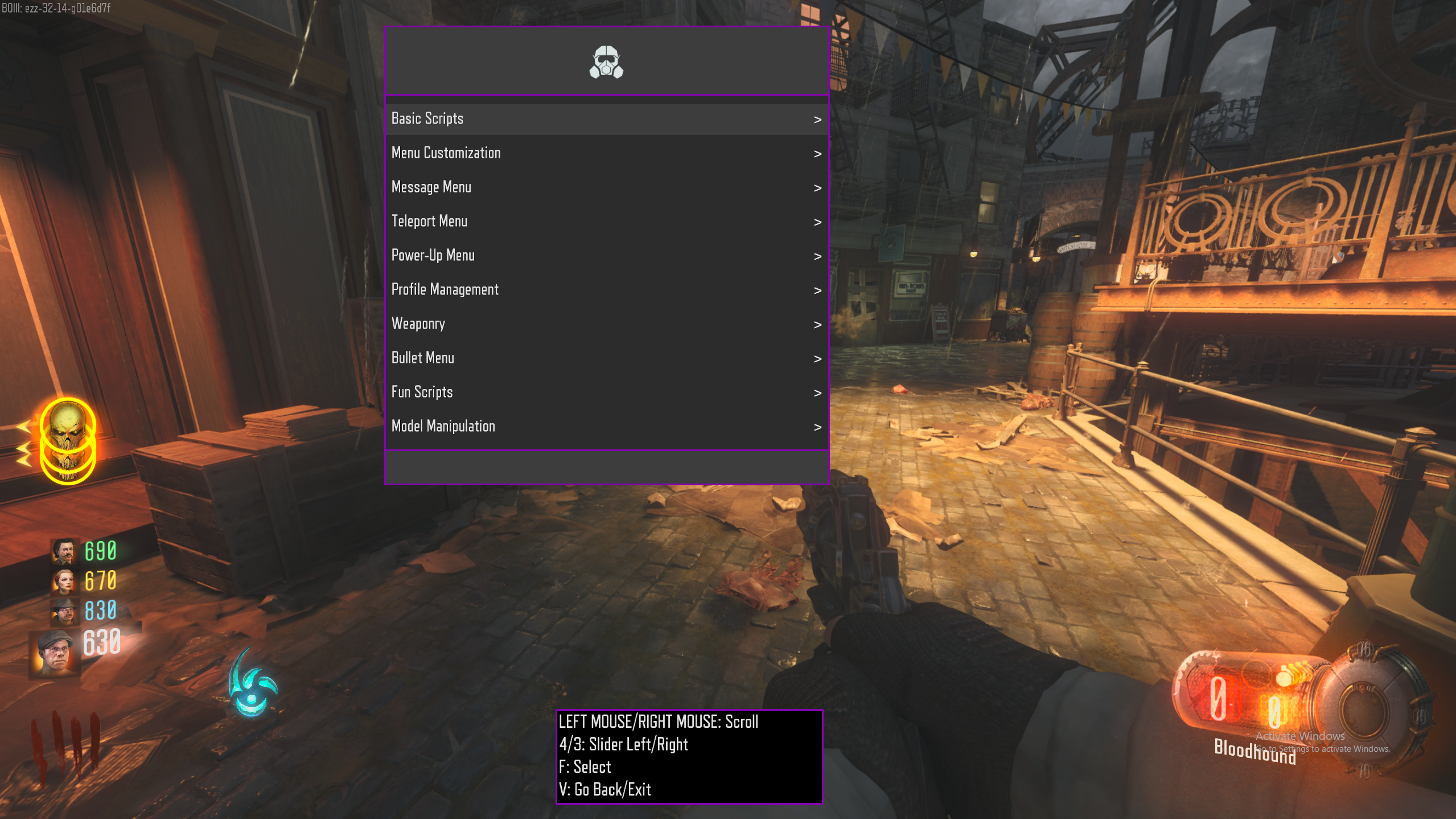
Experience BOIII Client in Action

Discover how BOIII enhances your gameplay with a smooth interface, advanced features, and optimized performance — all in one powerful client.
Top BOIII Client Features

Discover the powerful features that make BOIII Client the best choice for enhancing your Black Ops 3 gameplay experience.

Clean & Optimized Interface

Enjoy a smooth, lightweight interface designed for fast navigation and better in-game performance without distractions.

High Performance Boost

Reduce lag, improve FPS, and experience faster load times with optimized client performance.

Custom Server Access

Join and host private servers easily with improved matchmaking and stable connections.

Enhanced Security

Stay protected with added security layers that help prevent common exploits and vulnerabilities.

Full Mod Support

Play custom maps and mods effortlessly with built-in support for community content.

Beginner Friendly Setup

Quick and simple installation process — no technical skills required to get started.

Download BOIII Client and Upgrade Your Gameplay

Get instant access to custom servers, enhanced performance, and a smoother Black Ops 3 experience. Set up in minutes and start playing without limits.

Blog

FAQs

What is BOIII Client?
BOIII Client is a custom game launcher and client used for playing supported versions of Call of Duty: Black Ops III with additional features, performance improvements, and mod support.
 
It is designed to enhance the gameplay experience by providing better optimization, access to custom servers, and extended modding capabilities compared to the standard game setup. BOIII Client is commonly used by players who want more control over multiplayer and modded gameplay environments. It also helps simplify game launching and server connection while supporting community-driven features and custom content.

Yes, BOIII Client is free to use.

It is a community-developed game client that can be downloaded and installed for free. However, you must already own a legitimate copy of Call of Duty: Black Ops 3 to use it, as it does not include the base game or official game files.

Yes, you need to own a legitimate copy of Call of Duty: Black Ops 3 to use BOIII Client.

The client only acts as a custom launcher and modification platform, so it does not include the base game files. You must have the original game installed for BOIII Client to work properly and access its features, servers, and mod support.

BOIII Client is generally considered safer than the original unmodified PC version of Call of Duty: Black Ops 3 because it includes security patches, dedicated servers, and protections against some known exploits.

The standard BO3 PC version has known security vulnerabilities in public matchmaking, exposing players to hacks or crashes. BOIII Client helps reduce these risks by improving server structure and patching certain exploits.
However, since BOIII Client is a community-developed tool and not officially supported by Activision, its safety also depends on where you download it from. Using unofficial or modified versions can introduce security risks.
For safer use:
  • Download only from trusted or official project sources
  • Avoid unknown third-party repacks or cracked files
  • Use it with a legitimate copy of the game
👉 Always download BOIII Client from our official page: https://boiiiclient.com/
Yes, BOIII Client supports multiplayer for Call of Duty: Black Ops 3 through community servers.
It allows players to join dedicated servers instead of official matchmaking, giving access to custom lobbies, modded game modes, and improved server stability. These servers are hosted and managed by the community, which also enables additional features like mod support and enhanced gameplay options.
To play multiplayer, you simply connect to available servers through the BOIII Client launcher after installing the game.
Yes, BOIII Client supports mods for Call of Duty: Black Ops 3, including custom maps, gameplay mods, and community-created content.
It allows you to use modded content through dedicated servers and custom setups, enabling features such as custom game modes, zombies mods, and server-side modifications.
Mod support includes:
  • Custom maps and game modes
  • Zombies and gameplay modifications
  • Community-created server content
Some mods may not work if they are outdated or not compatible with the client version, so proper setup and updated mods are required for best results.
To install BOIII Client, you first need a working installation of Call of Duty: Black Ops 3 on your PC.
After that, download the BOIII Client setup files from the official source and extract them to a folder on your system. Run the client installer or launcher file, then point it to your existing Black Ops 3 game directory when prompted.
Once setup is complete, launch BOIII Client and it will load the game with custom server access and additional features enabled. Make sure your game files are not modified or missing for proper installation and performance.
 
Yes, BOIII Client can improve performance in Call of Duty: Black Ops 3 for many users.
It is optimized to provide a smoother gameplay experience compared to the standard game client.
Key improvements may include:
  • More stable FPS during gameplay
  • Reduced stuttering and lag on supported servers
  • Faster and more optimized server connections
  • Better overall stability in custom and community matches
Performance results can vary depending on your PC hardware and the server you are playing on.
Yes, you can use BOIII Client on multiple devices as long as each device meets the requirements and has a proper installation of Call of Duty: Black Ops 3.
BOIII Client is not restricted to a single machine, so you can install and run it on multiple PCs. However, each device must have its own valid game files, and you need to set up the client individually on each system.
Key points:
  • Install BO3 and BOIII Client separately on each device.
  • Use the same account or set up if required by the servers.
  • Ensure each system meets performance requirements for smooth gameplay.
No, BOIII Client is not officially supported by Activision or Treyarch.
It is a community-developed third-party client for Call of Duty: Black Ops 3 that operates independently from the official game developers. While it is widely used for custom servers, performance improvements, and mod support, it lacks official backing from the original game publishers.
Because it is unofficial, updates, fixes, and server support depend entirely on the community rather than Activision’s official development team.